一.开发者常见问题
1.已解决问题
| 问题类型 |
|---|
| 系统安装、启动与固件 |
| 编译与工具链 |
| 硬件与驱动 |
| AI与高性能计算 |
| 软件适配与生态 |
| 其他 |
系统安装、启动与固件
【问题】muse card 2.1 升级到3.0 卡死了……咋终止uboot?
【回答】按s
【问题】目前 Ubuntu 25.04 和 Debian 13 官方 ISO 镜像的 grub 在启动的时候都会遇到 relocation overflow 这个报错,导致无法进入 GRUB
我用来生成 GRUB image 的指令是:
grub-mkimage -O riscv64-efi -o bootriscv64.efi --prefix=/EFI/boot iso9660
这个问题可以通过下载 Ubuntu / Debian 官方的通用 RISC-V ISO 并尝试启动来复现
【回答】在/etc/apt/sources.list.d/bianbu.sources中的deb后面添加deb-src,再sudo apt update;apt source grub2,grub需要添加如下patch:
Date:   Thu Dec 5 10:38:09 2024 +0800

    relocation-overflow: fix boot fail while run it from UEFI with multi-range memory layout

    patch source:
    https://lf-rise.atlassian.net/wiki/spaces/HOME/pages/8586141/DI_01_01+GRUB+-+Relocation+overflow+on+RISC-V+with+multi-range+memory+layout

    a relocation problem happened in grub_arch_dl_relocate_symbols() of
     grub-core/kern/riscv/dl.c:

            case R_RISCV_CALL:
            case R_RISCV_CALL_PLT:
              {
                grub_uint32_t *abs_place = place;
                grub_ssize_t off = sym_addr - (grub_addr_t) place;
                grub_uint32_t hi20, lo12;

                if (off != (grub_int32_t) off)
                  return grub_error (GRUB_ERR_BAD_MODULE, "relocation
    overflow");

    It requires `off' in the range of int32, but it's not enforced since the
    >4GB memory can be used.

    This patch MAY be repaced in the future.

    Change-Id: Ie9bedb15ca05071c908f3e0ace2da19edcba976b```
【问题】系统已升级到 2.2.6, 运行正常,但是 ssh 登陆发现显示的版本是错误的 (依旧显示 2.1.5),一番查找发现是 base-files 这个包(包含了 /etc/issue, /etc/os-release 等文件)没有更新。
【回答】抱歉,是base-files软件包未升级,现已更新,请使用以下命令将base-files软件包升级至最新版本:
sudo apt update
sudo apt install base-files
【问题】我对版本还有一点疑问,这里似乎存在多个不同的版本概念。
Bianbu文档中提到的 2.1, 2.2, 3.0, 和这个 bianbu-computer 的版本不一样是吗?
提出此疑问,是因为Ubuntu中,base-files 中的版本,跟Ubuntu本身的版本是一致的,都是比如 24.04.3
【回答】是的,bianbu star是基于bianbu 2.0构建的融合桌面操作系统,目前最新固件版本是v2.1.6
截至2025年9月2日,bianbu-computer 已发布固件的最新版本正是 v2.1.6。
固件地址参见:Index of /image/k1/version/bianbu-computer/v2.1.6

【问题】BTW, this image can’t be booted, too:
Index of /cdimage/daily-builds/sid_d-i/current/riscv64/iso-cd
Although, I noticed the dtb files have been added toDebian’sdevice-treedirectory
【回答】The daily image of debian13 does not include spacemit’s BSP, so it cannot be booted. In fact, the debian 13 image we provide is also a customized version specifically for spacemit k1 (including replacing the native BSP with spacemit’s BSP)
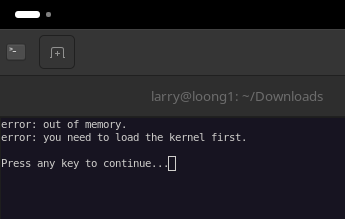
【问题】Is BPI-F3 supported OpenHarmony 5.0
【回答】yes, use this firmware: https://archive.spacemit.com/image/k1/version/openharmony5.0/openharmony-spacemit-deb1-hdmi-20250424.zip
【问题】It seems crashes are got.
sys: 0x0
try sd...
bm:3
j...

U-Boot SPL 2022.10spacemit-gf9de97f27-dirty (Aug 26 2025 - 01:43:51 +0000)
[   0.223] DDR type LPDDR4X
[   0.223] set ddr tx odt to 80ohm!
[   0.244] lpddr4_silicon_init consume 21ms
[   0.245] Change DDR data rate to 2400MT/s
[   0.458] Boot from fit configuration k1-x_deb1
[   0.460] ## Checking hash(es) for config conf_1 ... OK
[   0.465] ## Checking hash(es) for Image uboot ... crc32+ OK
[   0.476] ## Checking hash(es) for Image fdt_1 ... crc32+ OK
mmc_load_image_raw_sector: mmc block read error
mmc_load_image_raw_sector: mmc block read error
[   0.528]

U-Boot 2022.10spacemit-gf9de97f27-dirty (Aug 26 2025 - 01:43:51 +0000), Build: jenkins-BSP-build-deb-759

[   0.536] CPU:   rv64imafdcv
[   0.539] Model: spacemit k1-x deb1 board
[   0.543] DRAM:  DDR size = 16384 MB
[   0.546] 16 GiB
[   0.614] reset driver probe start
[   0.616] reset driver probe finish
[   0.643] Core:  409 devices, 29 uclasses, devicetree: board
[   0.656] WDT:   Started PMIC_WDT with servicing (60s timeout)
[   0.661] WDT:   Started watchdog@D4080000 with servicing (60s timeout)
[   0.670] MMC:   sdh@d4280000: probe done.
[   0.677] sdh@d4281000: probe done.
[   0.677] sdh@d4280000: 0, sdh@d4281000: 2
[   0.681] Loading Environment from MMC... sdh@d4280000: set tx_delaycode: 95
[   0.881] sdh@d4280000: pass window [16 73)
[   1.006] sdh@d4280000: pass window [77 195)
[   1.009] sdh@d4280000: pass window [196 197)
[   1.069] sdh@d4280000: pass window [235 255)
[   1.071] sdh@d4280000: tuning done, use the firstly delay_code:135
[   1.223] OK
[   1.317] Found device 'hdmi@c0400500', disp_uc_priv=000000007dea78c0
[   1.427] HDMI cannot get HPD signal
[   1.427] spacemit_display_init: device 'dpu@c0340000' display won't probe (ret=-1)
[   1.445] initialize_console_log_buffer
[   1.446] Have allocated memory for console log buffer
[   1.451] In:    serial
[   1.453] Out:   serial
[   1.456] Err:   serial
[   1.459] Default to 100kHz
[   1.576] Found 2 valid MAC addresses.
[   1.681] HDMI cannot get HPD signal
[   1.681] display devices not found or not probed yet: -1
[   1.686] All buttons probed successfully
[   1.691] Read PMIC reg ab value f4
[   1.694] Failed to get fastboot key config: -19
[   1.725] Net flash mode not enabled
[   1.726] Failed to probe HUSB239: -19
[   1.729] Continue to boot
[   1.791] 79 bytes read in 7 ms (10.7 KiB/s)
[   1.792] ## Info: input data size = 80 = 0x50
[   1.796] load env_k1-x.txt from bootfs successful
[   1.802] Net:   RGMII interface
[   1.804] eth0: ethernet@cac80000
[   1.809] Autoboot in 0 seconds
[   1.820] Try to boot from mmc0 ...
[   1.914] product_name: k1-x_deb1
[   1.915] match dtb by product_name: spacemit/6.6.63/k1-x_deb1.dtb
[   1.921] select spacemit/6.6.63/k1-x_deb1.dtb to load
[   1.926] Loading kernel...
[   2.317] 36728832 bytes read in 356 ms (98.4 MiB/s)
[   2.319] Loading dtb...
[   2.363] 88384 bytes read in 23 ms (3.7 MiB/s)
[   2.365] Loading ramdisk ...
[   2.604] 20184657 bytes read in 219 ms (87.9 MiB/s)
No FDT memory address configured. Please configure
the FDT address via "fdt addr <address>" command.
Aborting!
[   2.635] Moving Image from 0x8000000 to 0x600000, end=299b000
[   2.654] ## Flattened Device Tree blob at 31000000
[   2.656]    Booting using the fdt blob at 0x31000000
[   2.661]    Loading Ramdisk to 7ca3f000, end 7dd7ee51 ... OK
[   2.684]    Loading Device Tree to 000000007ca26000, end 000000007ca3e93f ... OK

Starting kernel ...
【回答】It seems that you burned the image directly into the SD card and then started it using the SD card.
(1) From the log of loading Uboot from SPL, it can be seen that there is an error message from MMC when reading Uboot. It is suspected that Uoot may have incomplete data when loading the kernel. Please try replacing the SD card or directly burning it to the onboard EMMC
(2) If the problem persists, press and hold “s” to enter the uboot command line. If it is an SD card, execute the command: load mmc 0:5 0x008000000 vmlinuz-6.6.63. If it is an EMMC, execute the command: load mmc 2:5 0x008000000 vmlinuz-6.6.63. Then run md 0x008000000 36728832 to print out the kernel data and compare whether it is complete
【问题】And how can I boot this image you provided from nvme?I wrote pack_dir.img to the nvme driver via dd, but, … I am so frustrated about rv.
【回答】I think the way you flash the firmware is incorrect. Please use the Titan tool to flash the. zip (not. img. zip) image to your k1 device
【问题】在WSL上对bianbu-linux6.6内核代码进行交叉编译后得到了.deb包,然后copy到K1开发版上进行内核的更新。
musepi@k1:/tmp$ sudo dpkg -i linux-image-6.6.63_6.6.63-01732-g65faf0e1df89-4_riscv64.deb
[sudo] musepi 的密码:
正在选中未选择的软件包 linux-image-6.6.63。
(正在读取数据库 ... 系统当前共安装有 251272 个文件和目录。)
准备解压 linux-image-6.6.63_6.6.63-01732-g65faf0e1df89-4_riscv64.deb  ...
正在解压 linux-image-6.6.63 (6.6.63-01732-g65faf0e1df89-4) ...
dpkg: 依赖关系问题使得 linux-image-6.6.63 的配置工作不能继续:
 linux-image-6.6.63 依赖于 spacemit-flash-dtbs;然而:
  未安装软件包 spacemit-flash-dtbs。
 linux-image-6.6.63 依赖于 bianbu-esos (= 0.0.10);然而:
  系统中 bianbu-esos 的版本为 0.0.6。

dpkg: 处理软件包 linux-image-6.6.63 (--install)时出错:
 依赖关系问题 - 仍未被配置
在处理时有错误发生:
 linux-image-6.6.63
首先缺失spacemit-flash-dtbs应该怎么解决?
然后 bianbu-esos (= 0.0.10)应该怎么升级?
【回答】Bianbu系统版本过低导致,建议升级到2.2.1或者3.0.1版本(也可直接重刷固件),2.0.x 和 2.1.x已停止维护。
如确有需要在旧版本上安装新内核,可参考如下步骤安装缺失的包
wget https://archive.spacemit.com/bianbu/pool/main/s/spacemit-flash-dtbs/spacemit-flash-dtbs_1.2.2_riscv64.deb
wget https://archive.spacemit.com/bianbu/pool/main/b/bianbu-esos/bianbu-esos_0.0.10_riscv64.deb
sudo dpkg -i spacemit-flash-dtbs_1.2.2_riscv64.deb bianbu-esos_0.0.10_riscv64.deb
【问题】第一次使用K1,在东山那里买了MUSE PI PRO,回来下载固件bianbu-25.04-desktop-k1-v3.0.1-release-20250815185656,使用 刷机工具烧录卡启动,启动后Log如下,无法进入系统。帮忙看是什么问题?刷机刷过好多次了,都是这样,卡也换了一张,也是一样。
【回答】您是用TITANTOOLS 烧录卡功能 将https://archive.spacemit.com/image/k1/version/bianbu/v3.0.1/bianbu-25.04-desktop-k1-v3.0.1-release-20250815185656.zip 烧录到sd卡的么?
可以先尝试用https://etcher.balena.io/
烧录https://archive.spacemit.com/image/k1/version/bianbu/v3.0.1/bianbu-25.04-desktop-k1-v3.0.1-release-20250815185656.img.zip 到sd卡~
编译与工具链
【问题】你好,请问是否有办法把bianbu linux 2.2.7的buildroot系统由gcc切到llvm?我需要跑llvm pass
【回答】package/llvm/Config.in · Bianbu Linux/buildroot - Gitee.com 你可以尝试交叉编译 Bianbu Linux的buildroot不支持llvm
【问题】drivers/pci/controller/dwc/pcie-k1x.c · Bianbu Linux/linux-6.6 - Gitee.com
此处init标记是否应当去掉?编译器告警在drivers/pci/controller/dwc/pcie-k1x.c · Bianbu Linux/linux-6.6 - Gitee.com 处有可能的调用,在运行时可能调用被init释放的空指针
【回答】的确,如果pcie驱动是在free了init空间之后probe的,这里会出问题,我们更新一下代码
【问题】使用官网的编译器安装包,分别使用
GCC(riscv64-unknown-linux-gnu-gcc) 和LLVM(clang)
编译相同的代码,代码中有很多矩阵和向量运算,LLVM编译出的程序,和GCC编译的运行时间差别不大,代码中没有调用芯片中的扩展指令,请问官网的LLVM编译器没有自动向量化的功能吧?
如果要使用扩展指令,需要手动修改代码调用扩展单元的指令吗?
【回答】>LLVM编译出的程序,和GCC编译的运行时间差别不大
正常,目前两个编译器并没有哪个具有绝对优势,要看具体的case了,应该是有些gcc更好有些llvm更好
'>代码中没有调用芯片中的扩展指令
那结果中就不会有了。目前只有进迭的指令只有汇编器支持。
'>请问官网的LLVM编译器没有自动向量化的功能吧?
有的,基于社区版本,而社区版本本身就已经有自动向量化功能。-O2以上就会默认启用。
'>如果要使用扩展指令,需要手动修改代码调用扩展单元的指令吗?
是的,要直接在代码中使用指令。论坛中有其他的相关话题的贴子可以参考下。例如 K1 IME拓展 矩阵乘 程序执行错误 - K1 - 进迭RISC-V论坛
【问题】BianbuCloud上面ISA中没有IME扩展,如何使用vmadot?直接使用vmadot,加-mcpu=spacemit-x60编译,运行时还是会出现“非法指令(核心已转储)”。
【回答】onnxruntime/onnxruntime/core/mlas/lib/sqnbitgemm_kernel_spacemit_ime_int8.cpp at spacemit-dev-1.21.0 · spacemit-com/onnxruntime · GitHub 可以参考这个实现
硬件与驱动
【问题】想问下这里的scratchpad memory是SRAM吗?这个回答里面的意思是说所有的vector load指令都能够访问scratchpad memory吗?请问有没有教程说明怎么用编程的方式使用它?
【回答】>想问下这里的scratchpad memory是SRAM吗?是的
'>请问有没有教程说明怎么用编程的方式使用它? 看看这个有用不如何利用K1开发板的TCM缓存
【问题】问一下群里的大佬们,开发板功率一直到不了12V3A的标定功率是为什么呀 这是我跑着模型的时候测的,待机的时候只有2.4w呢 所以上限就这么高吗
【回答】好像确实差不多就5w左右的样子 顺序核心功耗不太高
【问题】MUSE PI PRO 调用gpiod 设置引脚高电平失败
设置高电平,回读是低电平
【回答】你好
1.我们同事在Muse Pi Pro自带的bianbu computer 2.1.3及以后的镜像进行了验证,发现gpio的硬件配置是没有问题的;请先确保版本是符合要求的,版本地址如下:Index of /image/k1/version/bianbu-computer
2.可以使用我们的gpio-zero工具进行验证和开发,使用方式如下:Python 用户指南 | Bianbu | 进迭时空开发者社区


【问题】我正在修改Linux Kernel dts设备树描述文件,我希望知道其中哪些物理内存范围是可以被缓存。这个定义是由SoC通过PMA设置,我没有在SDK和社区中找到相关内容。我希望能知道整个物理内存空间的PMA设置情况。
【回答】PMA硬件配置信息如下:
// [0x0000_0000 ~ 0x8000_0000) – Normal Memory, Cacheable
// [0x8000_0000 ~ 0xC080_0000) – Device, Strong Order
// [0xC080_0000 ~ 0xC084_0000) – Normal Memory, Cacheable
// [0xC084_0000 ~ 0xD800_0000) – Device, Strong Order
// [0xD800_0000 ~ 0xD844_0000) – Device, Strong Order
// [0xD844_0000 ~ 0xFFE0_0000) – Device, Strong Order
// [0xFFE0_0000 ~ 0x4_8000_0000) – Normal Memory, Cacheable
// [0x4_8000_0000 ~ 0xFF_FFFF_FFFF) – Device, Strong Order
AI与高性能计算
【问题】参考 进迭时空开发者社区 6.13章节
在MUSEPi Pro开发板使用onnxruntime_perf_test工具
$ MODEL=abs_free_dimensions.onnx
$ ARGS="${MODEL} ${MODEL%.onnx}.txt -m times -r 100 -R 10 -S 1 -H 6 -L 2"
$ onnxruntime_perf_test ${ARGS}

运行出错:abs_free_dimensions.onnx abs_free_dimensions.txt -m times -r 100 -R 10 -S 1 -H 6 -L 2 is not supported

1 尝试直接输入命令:
onnxruntime_perf_test abs_free_dimensions.onnx abs_free_dimensions.txt -m times -r 100 -R 10 -S 1 -H 6 -L 2
**出错**:onnxruntime_perf_test: invalid option -- 'R'

2 在后面的参数加双引号
onnxruntime_perf_test "abs_free_dimensions.onnx abs_free_dimensions.txt -m times -r 100 -R 10 -S 1 -H 6 -L 2"
**出错**:abs_free_dimensions.onnx abs_free_dimensions.txt -m times -r 100 -R 10 -S 1 -H 6 -L 2 is not supported

请问为什么会出现如上错误,abs_free_dimensions.txt 需要我自己准备这个文件吗?还是工具会根据后面的随机参数自动生成这个文件?
【回答】参考一下,./onnxruntime_perf_test demo.onnx -e spacemit -r 10 -x 1 -S 1 -s -I -c 1,或者./onnxruntime_perf_test demo.onnx -r 10 -x 1 -S 1 -s -I -c 1,后者不开启ep,你这个命令输入有问题
【问题】模型部署出现问题:模型部署出现问题
【问题】在使用社区中介绍的模型量化方法进行模型量化时,
第一步进行xquant-1.1.3-py3-none-any.whl安装时,使用$ python3 -m pip install spacengine-wheel/xquant/xquant-1.1.0-py3-none-any.whl --extra-index-url https://pypi.ngc.nvidia.com
这条命令报错不能连上这个网址,用电脑和手机连接 https://pypi.ngc.nvidia.com 这个网址也不能连接,请问有什么解决办法?
【回答】可在此链接查看当前由我们维护的pypi,xquant已更新至2.0.2, 软件包库 · archive / pypi · GitLab
另外,如果 --extra-index-url https://pypi.ngc.nvidia.com 无法连接,转为使用清华源/阿里源也可以,–extra-index-url Simple Index
【问题】在参考ONNX Runtime | Bianbu | 进迭时空开发者社区 我们实际在在MUSEPi Pro开发板上运行了一个模型,得到的推理时间如下:
不使用SpaceMit的ExecutionProvider时:inference time: 3072 ms.
使用SpaceMit的ExecutionProvider时 :inference time: 8396 ms.
疑惑的是使用SpaceMIT Execution Provider的推理时间反而更长!是进迭时空官网下载的,
下载连接:https://archive.spacemit.com/spacemit-ai/onnxruntime/spacemit-ort.riscv64.1.2.2.tar.gz
压缩包里有libonnxruntime.so,libonnxruntime-genai.so
但是,libonnxruntime.so没有搜到vmadot调用,
libonnxruntime-genai.so搜到smt.vmadotsu.hp v17,v26,v14,v1,3,i8 请问SpaceMIT Execution Provider确定会调用CPU的矩阵扩展指令吗?
在使用SpaceMIT Execution Provider的时候,有特殊需要注意的事项,我们没有考虑到吗?
【回答】对于K1,只有量化模型存在AI指令加速的情况,那么对模型量化之后,性能情况会有大幅好转(大概10倍+),另,相关推理库升级至2.0.0+beta2版本,使用该链接下载,https://archive.spacemit.com/spacemit-ai/onnxruntime/spacemit-ort.riscv64.2.0.0%2Bbeta2.tar.gz
(该链接大概在9.8可以开放)
【问题】在使用1.2.2版本库的时候,模型量化使用x86版本的onnxruntime,生成int8的onnx版本模型后,在开发版上直接跑,结果上看,没有按照期望的调用spaceMit的EP,请问量化这一步,可以用x86的做吗?
【回答】不建议,因为ep对量化格式有一点要求,比如权重对称量化之类,模型量化最好用xquant, 软件包库 · archive / pypi · GitLab,那么当然,xquant可以在x86上跑,进迭时空开发者社区 这个文档有点旧,也可以勉强看看
python -m xquant --config ./demo_json.json
# 指定输入以及输出模型路径
python -m xquant -c./demo_json.json -i demo.onnx -o demo.q.onnx
# 默认动态量化,不需要json配置文件
python -m xquant -i demo.onnx -o demo.q.onnx
# 转为FP16,不需要json配置文件
python -m xquant -i demo.onnx -o demo.q.onnx --fp16
软件适配与生态
【问题】进迭会考虑适配下 Frigate NVR 项目么?一个国外开源的智能NVR项目,如果M1的解码器能支持4路1080P30的话,还是很有趣的。目前他们貌似还没有适配RISCV的平台
【回答】这个有
其他
【问题】大家好,想问一下:板子连的是校园网,不在校园网的用户用了easyconnect 能ssh登录校园网的其他服务器,却不能登录板子。需要用本地VSCodium编辑器对板子上的代码进行编译,应该本地连接板子呢
【回答】1,这是用你的电脑下载vscodium远程连接板子的教程:rscv vscodium(vscode) 远程开发环境搭建
PS:如果连不上,这里有faq,第一条:进迭时空学习专区
2,或者你使用Windows远程登陆板子,这里是教程帖:Windows远程登陆muse pi pro
【问题】你们titan flash解压后的临时文件都不删吗?在temp里留一堆垃圾
【回答】关闭工具会自动删
【问题】基于进迭K1开发板环境,对RVV向量指令,如果依次设置LMUL为1,2,4,8目前看到,LMUL>1,即从1到2 性能提升很大;但是从2开始,到4,8相差不大。这个有人知道原因吗。主要是用RVV进行向量点积运算。如下图所示,两个向量大小都是65536维,元素一个向量全是1.0f, 另外一个向量全是2.0f,vls表示有效的vl值,now是计算结果。
【回答】K1的核X60,是个双发顺序处理器 ,你的结论是对的
【问题】Could you tell me if SpacemitExecutionProvider is an open-source project, can I see its source code somewhere? Or is the libspacemit_ep library closed?
I am interested in the scenario of using tcm memory.
【回答】The libspacemit_ep library is now closed. Maybe this will help: tcm: tcm lib and application demo
2.导入内部问题
【问题】我们有没有公开cache miss的latency?有没有相关的手册?指令cycle数什么的
【问题】我建议你们可以运行ltp测试,以及更新相关工具链比如buildroot和编译器等等。不然做benchmark看到baseline还有failed test还是挺无语的
【问题】How to use scratchpad memory
【问题】Bianbu OS上有没有可用的录屏软件?刚刚尝试了自带的 ffmpeg 和 apt 安装的 wf-recorder 均不行。我需要同时录制音频
【问题】我们使用命令安装量化工具:pip --trusted-host pypi.tuna.tsinghua.edu.cn --disable-pip-version-check install spacemit-ai-sdk.v1.1.0/spacengine-wheel/xquant/xquant-2.0.3-py3-none-any.whl -i Simple Index
遇到问题:ERROR: Could not find a version that satisfies the requirement appdirs<1.5,>=1.4 (from versions: none)
ERROR: No matching distribution found for appdirs<1.5,>=1.4
发现在下载依赖nvidia-pyindex时就报错,不知是什么原因?
【问题】AI 模型量化的使用,ValueError: embedded null character
请问错误原因是校准数据NPY文件的问题吗?还是配置文件json出了问题?AI 模型量化的使用
【问题】请问xquant这个工具,需要在进迭时空的开发板上运行?还是在x86电脑上也可以运行?我现在在x86电脑运行xquant的时候,报了以下错误:Einsum(Einsum) has no backend implementation on target platform TargetPlatform.FP32,看上去需要指定backend
【问题】请问musepi pro的openharmony系统对USB摄像头的支持怎么样啊,我这里自带的相机系统应用无法调用起摄像头啊,还有muse book的openharmony系统下的相机应用也无法调用自带的摄像头
二.优秀案例
YouTube

Banana Pi BPI F3 SpacemiT K1 8 Core RISC V Chip 4G LPDDR4 16G


[SpacemiT Ambassador] Unlock Accessible Computing Power! Bianbu Computer: RISC-V Terminal Solutions

SpacemiT released Debian 13 image for K1 based products


